This section will help you to stay safe as you navigate the internet. The internet connects you to the entire world, and we all know the world contains many people with bad intentions. Luckily, it is easy to stay safe – as long as you know what to look out for!
Click the boxes below to go to that section!
Scams are when someone tries to trick you into giving them your money or information.
Viruses are programs that can infect your computer, causing it to break, or give up your personal data.
You need to be careful what personal information you post online, and where you post it.
Scams are when someone tries to trick you into giving them your money or information.
Scammers use the following ways to try to steal your information. We will go through them one-by-one.
What do we mean by Phishing?
A scam email will normally try to get you to click a link. Scammers do this by pretending to be someone they are not. This is called Phishing.
Phishing Example:
Common examples of phishing scams are emails designed to look exactly like legitimate emails you might receive. For example:

Activity:
1. Click here and scroll down to the section titled ‘Phishing’.
2. Explore the interactive email to learn the key giveaways of a phishing email.
3. Write these down, then return to this page.
4. See if you can spot any of these giveaways in the email above.
5. For more examples of phishing emails, see the Phishing Challenge section below.
Phishing can happen over text?
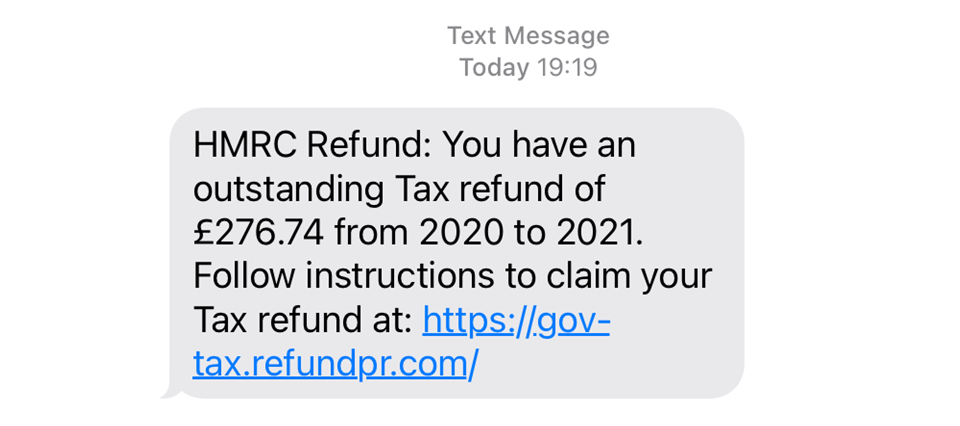
Phishing can also be done over text. In fact, this is far more common. There are some very convincing phishing texts out there, and many of us have been caught out by them at some point. Don’t feel guilty if you do click a link, it’s normally not the end of the world.
Example of a phishing text
See below for an example phishing text. You may well have received something like this in the past!
Activity:
Complete the Phishing Challenge below to test your phish-catching skills!
What is a fake website?
Scammers sometimes create fake websites to trick you into giving up your money or data.
For example, the website below is a perfect replica of Amazon.com. The only difference is in the URL.

You would be forgiven for believing this website and using it to make a purchase. In doing so, you would have provided the scammer with your bank account details, meaning you’d need to freeze your account!
Where do you (normally) come across fake websites?
Pop ups: Fake websites normally appear as ‘pop ups’. Pop ups are websites that appear on your screen without you choosing to open them. Pop ups are most common when you are using illegitimate websites (e.g. streaming services, porn websites etc.).
Phishing Emails: Often when you click a link on a phishing email you will be directed to a fake website. You can see this as a positive as its another opportunity to notice you are being scammed and put a stop to it!
What should I do when I encounter a fake website?
Close it down!
You can get scammed over the phone?
Yes! Scammers sometimes try to trick you into giving your information over the phone. They do this by pretending to be someone you trust (e.g. your bank or your phone provider).
See the video below for information about what to look out for with phone scams.
How should I protect myself against phone scams?
!!! This third tip is is the most important as it guarantees you are protected !!!
If the call was legitimate, then you simply continue the conversation – no harm done. If it was illegitimate, you have escaped a potentially dangerous situation.
Toggle Content
No. You are only at risk of scams when you give out your information.
Top tip: If you find yourself giving out your information at any time, have a long hard think about whether you trust who you are giving it to.
Viruses (or ‘Malware’) are programs that can infect your computer, causing it to break, slow down, or give up your personal data.
Viruses can be created by:
Before we start…
Downloading:
When you copy data from the internet onto your computer.
Installing:
When you ‘unpack’ the file you have downloaded onto your computer, turning it into an actual file.
Think of it like flat-pack furniture. Downloading is like buying something from IKEA and bringing it home. Installing is like putting the piece of furniture together.
If you click on a link in a phishing email or text, you can make yourself vulnerable to a drive-by download attack. This is how it happens:
Downloading files from untrusted sources carries a high risk of catching a virus. Sometimes seemingly legitimate programs can be bundled up with hidden malware, like a mouldy apple that makes the entire bushel go bad.
Common examples:
Some websites are designed to automatically download malware onto visitors’ devices.
Clicking on fake “You’ve won a prize!” pop-ups or sketchy ads can lead to these types of infections.
If you dont have an ad-blocker, or your system has security vulnerabilities, this could be a danger to your device.
Plugging in an infected USB stick or external hard drive can spread malware instantly.
Did you know? Massive corporations have fallen foul to this type of attack. For example, a curious soldier in a US military base in the middle east found a USB stick on the floor of the car park. Without thinking, he plugged it into his computer, and accidentally spread a worm across the entire Pentagon network!
Downloading apps from unofficial sources (especially on Android) can lead to malware infections.
Some malicious apps steal data, track activity, or even lock the phone for ransom
Your digital footprint is the trail of data you leave behind when using the internet.
Things like:
all contribute to your digital footprint…
Most of the information listed above is not publically available. Your search history, sent emails, visited websites, and online purchases are all private information shared between you and the website provider.
If you find yourself in serious legal trouble (e.g. you are a spy 😉) you may find that law enforcement agencies can access this data in their investigations. Certain websites will flag the authorities automatically (e.g. sites relating to terrorism, child pornography etc.). Otherwise, there is no reason to worry about your private information.
You do need to be careful about your publically shared data. This includes:
This information can be misused by fraudsters if they were to get their hands on it.
There is one set of settings that makes a HUGE difference: your Privacy Settings. Watch the video below to see just how easy it can be to access our data:
Facebook privacy settings allows you to choose who you share certain content with like posts, photos, and stories.
There are four options. These become less and less private as you go down the list:
To make your account private, you should set all of your settings to ‘friends’ or ‘only me.’ You would only set your settings to ‘everyone’ if you are trying to promote yourself or your business.
See below for a video on how to adjust your settings on your mobile:
Privacy settings on Instagram are simple. There is just one setting, called ‘account privacy.’
You can choose the following settings:
Follow the instructions in the video below to check your privacy settings on your instagram account.
Twitter/ X works in the same way as Instagram and similarly to Facebook. You can set your account to ‘private’ meaning only those people who follow you can see your tweets.
See the video below for how to do this:
The most valuable information you have are your contact details. That is, your email address, home address and phone number.
This is because there are thousands of companies that buy this type of information so they can send you spam promotions (which they sell to companies as advertising).
If you post your email or phone number to a public space online (e.g. an online forum, your facebook page, or in the comments section of a post or video), then you can expect to receive many many spam emails. In most cases, this will eventually require you to change your email or phone number – which is a big hassle!
So, never post your email or phone number in public space.
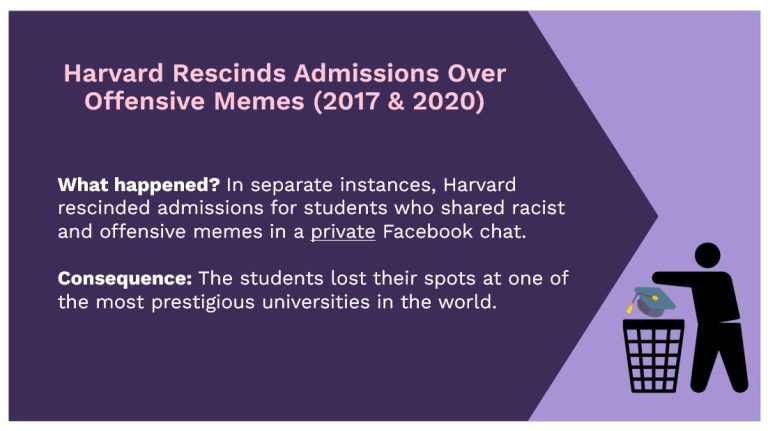
It is also worth considering what you post online anyway. Hateful, or even controversial opinions can reflect badly on someone, and the issue with posting them online is there’s a danger they are there forever.
Sure, you can delete a post, but if someone has taken a screenshot of it before you took it down, you have no ability to delete that!!
Top tips:
Scroll through the case studies below to see some examples of peoples digital footprint catching up to them!


© St Mungo’s 2026